














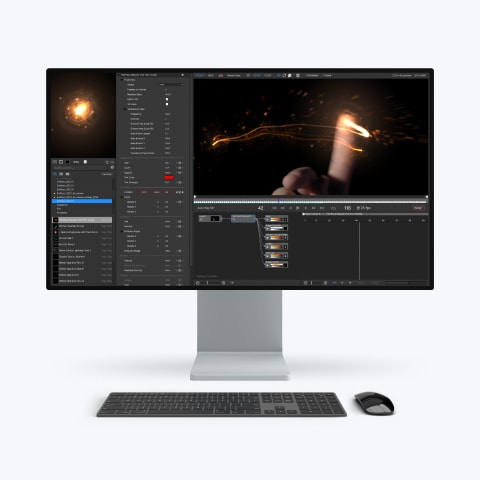
Particle Illusion Pro is a powerful particle generator that gives users instant access to 3D particles. Quickly create photorealistic particle effects to use for motion graphics, visual effects, titles, and lower thirds. Available as a fully functional standalone application and as a plugin part of the Continuum suite of effects.
Bring your animations to life with Particle Illusion
Fluid Dynamics
Fluid Dynamics allows you to transform any existing emitter into a complex animation that flows and swirls, just like in the real world, or to create your own custom animation. It includes more than 20 new presets designed by professionals.
Work in 3D
Work with emitters, forces, and deflectors in 3D, using the integrated camera to navigate through generated particle fields. Utilize position, pan, and orbit camera modes for navigation. Includes depth of field and motion blur features.
Forces and Deflectors
Force objects enable the addition of force fields to create complex, realistic particle movements, ranging from chaotic swirls to controlled flows, and even fluid dynamics. Deflector objects simplify the simulation of particles interacting with logos or other graphics, enabling them to bounce or interact seamlessly.
Lines and Turbulence
Connect your particles together with lines! Join particles to parent emitters, their birth positions, or even to other particles to create fresh, new geometric mograph looks. Turbulence varies the position and size of particles through auto-evolving, organic noise fields. Think of subtle wave-like motion, wild particle scatters, or anything in between.
Easy Preset-Driven Workflow
Particle Illusion comes with thousands of preset emitters (via a separate, free installer). An integrated search makes it easy to zero in on the effect you’re looking for, and the live preview lets you click and drag to see how it will move. Use as-is or adjust the position, shape, life, number, size, etc., by scrubbing values in the control panel. You can also create new presets by saving any adjusted emitter back into your custom emitter library.
Node-based Navigation
Particle Illusion lets you create extremely complex effects, but the Node View makes it easier than ever to work with and customize them. Simply select an emitter or particle node to see the corresponding parameters displayed in the Controls View.
Particle Illusion Showcase
System requirements
Mac OS"><path d="M4.51406 17.5098L2.71311 15.7398L12.7862 5.83977L22.8594 15.7398L21.0584 17.5098L12.7862 9.37977L4.51406 17.5098Z" fill="%23000000"/></g><defs><clipPath id="clip0_3722_33245"><rect width="24" height="24.4197" fill="white" transform="matrix(-4.44758e-08 -1 -1 4.29601e-08 25 24)"/></clipPath></defs></svg>)
OS Requirements
- Catalina 10.15 or higher
Processor (CPU)
- Intel, AMD, or Apple M1/M2/M3
System Memory (RAM)
- 8 GB minimum, 16+ GB preferred
Graphics Processor (GPU)
- Most modern graphics cards from AMD, NVIDIA and Intel are supported.

Windows"><path d="M4.51406 17.5098L2.71311 15.7398L12.7862 5.83977L22.8594 15.7398L21.0584 17.5098L12.7862 9.37977L4.51406 17.5098Z" fill="%23000000"/></g><defs><clipPath id="clip0_3722_33245"><rect width="24" height="24.4197" fill="white" transform="matrix(-4.44758e-08 -1 -1 4.29601e-08 25 24)"/></clipPath></defs></svg>)
OS Requirements
- Windows 10 & 11
Processor (CPU)
- Intel or AMD CPU with four or more cores
System Memory (RAM)
- 8 GB minimum, 16+ GB preferred
Graphics Processor (GPU)
- Most modern graphics cards from AMD, NVIDIA and Intel are supported.

What's New
Position Path Presets
Add motion to your emitters with ease with a selection of editable position path presets.Enhanced Position Data Workflow
Transform an emitterโs entire position path in space and time with several new tools.Parameter Search
Cut the parameter list down to size with a new search function.Particle Blending Modes
Particles can now use a variety of blending modes including Screen, Multiply, Overlay, Soft Light, Difference, and more.Improved Quality
Smoother results with Inherited Velocity, boosted Opacity values for brighter particles, and prettier 3D lines.Other Usability Enhancements
Resultant gradients, a โReplace Emitterโ function, position and angle data in the graph view โ all make using Particle Illusion easier than ever.
Position Path Presets
Add motion to your emitters with ease, choosing from a variety of useful, editable position paths. These can also be applied to any other position parameter, including the camera.
Enhanced Position Data Workflow
Several new features allow you to retime the emitterโs motion, easily rotate, scale, and translate the path, even equalize the timing for more consistent speed as it moves.
Parameter Search
No need to visually hunt for that one parameter in a long list โ parameter search will show only the ones youโre looking for, or can highlight them in place instead.
Particle Blending Modes
Previous versions of Particle Illusion let you only choose between regular and โintenseโ particles (additive). Now you can choose from a variety of blending modes including Screen, Multiply, Overlay, Soft Light, Difference, and more.
Improved Quality
Inherited velocity gives smoother results, Sprites that use โkeep aligned to motionโ work in all cases including fluids, and 3D lines which we added in 2024 are higher quality. You can also boost opacity values, cranking up the brightness of sparks and other hot particles.
Other Usability Enhancements
Resultant gradients show exactly how the color and alpha gradients will combine for your particles, โReplace Emitterโ function makes swapping emitters into your project a breeze, position and angle data is now shown in the graph view, and many more โ all make using Particle Illusion easier than ever.
Which should I choose?
Particle Illusion Pro offers total flexibility to fit seamlessly into your workflow, whether you prefer working within a standalone application or integrating it as a plugin with Continuum. Particle Illusion Pro ensures that your projects benefit from its full range of features in the environment that suits you best.
Standalone Key Benefits
No Host Application Required
Eliminate the extra costs and complexity of working inside an external application.Background Video Layer Import
Experience swift and smooth import and export processes, optimized for time-saving and efficiency.Rapid Rendering
Instantly bring your ideas to the screen with quick rendering times, even for the most complex particle effects.Plugin Key Benefits
Mocha Motion Tracking
The integration of Mochaโs Academy Award-winning planar tracking and masking tools inside the Particle Illusion plugin means no keyframing! Both the particle emitter position and the position of the world (camera) can be driven independently or together using Mochaโs tracking data. Let Mocha do the work to lock your particle effects into your shot.After Effects Integration
Use After Effects paths and text as animation paths for emitters or emission sources, link emitters to 3D layers and lights, or use the AE camera inside Particle Illusion.Beat Reactor
Drive particle properties from audio using the integrated Beat Reactor. Set up frequency ranges and configure them to modify any of the host-level particle parameters: velocity, number of particles, size, etc., resulting in particle effects perfectly in-sync with the music!Advanced Compositing Tools
Utilize features like integrated color correction, glow, and blending modes to enhance the integration of your particles.Compare Standalone vs Plugin
Standalone Application
Plugin inside Continuum
Work in 3D
Fluid Dynamics
Forces and Deflectors
Lines and Turbulence
Easy Preset-Driven Workflow
Node-based Navigation
Export w/Alpha
Import data from Mocha / SynthEyes*
Render on Source Video*
Track with Integrated Mocha
Animate with Beat Reactor
AE Camera Integration
Host Particle Parameters
Intergrated Glow
Advanced Compositing Options
Mograph experts John Dickinson and Ben Brownlee team up to deliver a comprehensive training series. Go from beginner to pro in no time with 27 bite-sized tutorials.
- How to install the product & get started quickly
- Get to know the interface and parameter controls
- How to use presets and emitters
- Intro to 3D particle features
- Intro to Turbulence and Lines options
- Intro to Fluid Dynamics
- And tons more!
Tutorials
Frequently asked questions
What is Particle Illusion?
Can I use the free version of Particle Illusion Pro for commercial work?
Can I buy a perpetual license for Particle Illusion Pro?
Why do I only see 3 emitter libraries instead of dozens?
How can I create a โblankโ emitter, to start from scratch?
How do you delete position keyframes?
Why do I get an โinternal data stream errorโ when trying to render?
How can I reset the preferences to default settings?
Can’t see your question listed above? Visit our Help Center
Get started with
a Particle Illusion Pro trial now
Need some hands on time with Particle Illusion before purchasing? No problem.
Simply download the Boris FX Hub and install Particle Illusion Pro without entering a license.
Youโre immediately ready to begin creating with the Particle Illusion Pro trial which is a standalone application that never expires.
Simply download the Boris FX Hub and install Particle Illusion Pro without entering a license.
Youโre immediately ready to begin creating with the Particle Illusion Pro trial which is a standalone application that never expires.
Core Features Enabled
In trial mode, you will have full access to many of the most powerful features of Particle Illusion Pro, from creating stunning visual effects to exploring our extensive library of presets. The trial mode doesn’t hold back on giving you the full experience of what Particle Illusion Pro has to offer.
Background Import Disabled
A limitation during the trial is the inability to import background layers. Donโt worry, you can still create amazing effects and get a solid understanding of the Particle Illusion Proโs capabilities, even without this feature.
Personal Use Only
Please note that the trial mode is intended for non-commercial or personal use only. It’s a great way to learn and explore Particle Illusion Pro’s potential before committing to a purchase.
