

















< Previous | Contents | Manuals Home | Boris FX | Next >
Copying Facility Presets into /User
Scenario. Studio presets are stored under /Facility (often locked) to maintain their integrity. This process lets you copy those presets into your personal /User area, where you can modify them as needed.
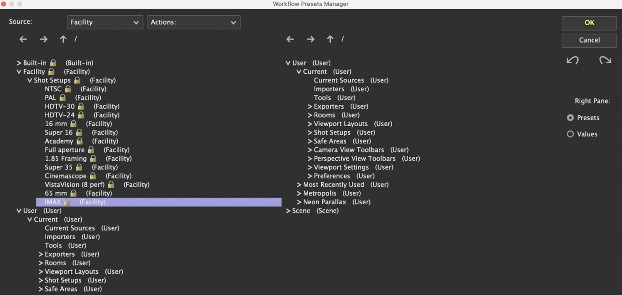
Open the Workflow Presets Manager. Go to Edit > Manage Workflow Presets.
Locate /Facility. In the left pane, expand /Facility to reveal its subfolders (e.g., Shot Setups, Rooms, Exporters). (Note: Even if /Facility is locked, you can still copy items out of it.)
Set the Right Pane to Presets Mode. Click the Presets radio button at the bottom right.
Navigate to /User. In the right pane, open /User where you want to store the copied preset. (Alternatively, if you see both /Facility and /User in the left pane, you can drag items directly between them there as well—no need to rely solely on the left-to-right approach.)
Copy the Desired Preset. Drag the preset (e.g., /Facility/Shot Setups/IMAX) from /Facility to the corresponding folder in /User. Confirm any overwrite prompts if a preset with the same name already exists.
Finalize. Click OK to save your changes or Cancel to discard them.
©2026 Boris FX, Inc. — UNOFFICIAL — Converted from original PDF.
