

















< Previous | Contents | Manuals Home | Boris FX | Next >
Velocity Spikes
Here’s an example of a velocity curve from the graph editor:
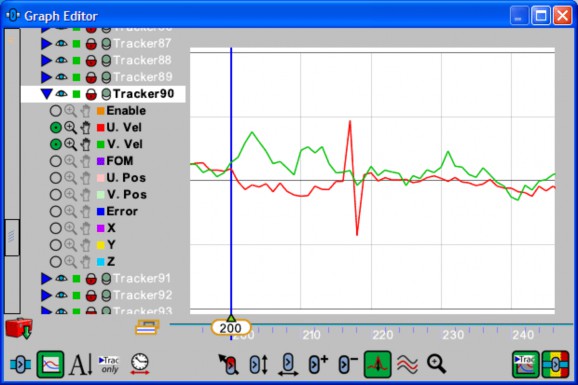
At frame 217, the tracker jumped about 3 pixels right, to a very similar feature. At frame 218, it jumped back, resulting in the distinctive sawtooth pattern the U velocity curve exhibits. If left as-is, this spike will result in a small glitch in the camera path on frame 217.
You can repair it using the Tracker control panel
 in the main user interface by going to frame 217. Jiggle back and forth a few frames with the S and D keys to see what’s happening, then unlock
  the tracker and drop down a new key or two. Step around to re-track the surrounding frames with the new keys (or rewind and play through the entire sequence, which is most reliable).
©2026 Boris FX, Inc. — UNOFFICIAL — Converted from original PDF.
