

















< Previous | Contents | Manuals Home | Boris FX | Next >
Lighting Control Panel
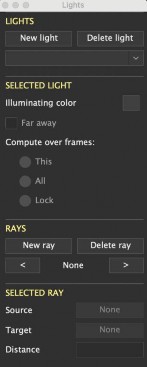
New light. Button. Click to create a new light in the scene.
Delete light. Button. Delete the light in the selected-light drop-down list.
Selected light. Drop-down list. Shows the select light, and lets you change its name, or select a different one.
Illuminating color. Swatch. Sets the color emitted by the light into the scene (used by the perspective view, and for export). There is a separate static value, plus an optional animated value typically created by the Set Illumination from Trackers script. The animated value is shown here if present; access the static value from the Hierarchy View. Note that the perspective view's ambient illumination can be set from Edit/Scene Settings (initialized from a color preference).
Far-awa. When checked, light is a distant, directional, light. When off, light is a nearby spotlight or omnidirectional(point) light.
Compute over frames: This, All, Lock . In the (normal) This mode, the light’s position is computed for each frame independently. In the All or Lock mode, the light’s position is averaged over all the frames in the sequence. In the All mode, this calculation is performed repeatedly for “live updates.” In the Lock mode, the calculation occurs only when clicking the Lock button.
New ray. Button. Creates a new ray on the selected light.
Delete ray. Button. Delete the selected ray.
Previous ray (<). Button. Switch to the previous lower-numbered ray on the selected light.
Ray number. Text field. Shows something like 1/3 to indicate ray 1 of 3 for this light.
Next ray (>). Button. Switch to the next higher ray on the selected light.
©2026 Boris FX, Inc. — UNOFFICIAL — Converted from original PDF.
