

















< Previous | Contents | Manuals Home | Boris FX | Next >
Coordinate System Control Panel
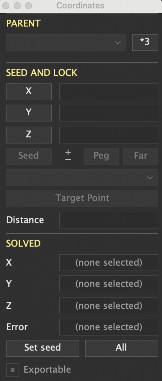
Camera/Object. Drop-down list. Shows what object or camera the tracker is associated with; change it to move the tracker to a different object or camera on the same shot (or, you can clone it there for special situations). Entries beginning with asterisk(*) are on a different shot with the same aspect and length; trackers may be moved there, though this may adversely affect constraints, lights, etc.
*3. Button. Starts and controls three-point coordinate setup mode. Click it once to begin, then click on origin, on-axis, and on-plane trackers in the camera view, 3-D viewports, or perspective window. The button will sequence through Or, LR, FB, and Pl to indicate which tracker should be clicked next. Click this button to skip from LR (left/right) to FB (front/back), or to skip setting other trackers. After the third tracker, you will have the opportunity to re-solve the scene to apply the new settings.
©2026 Boris FX, Inc. — UNOFFICIAL — Converted from original PDF.
