

















< Previous | Contents | Manuals Home | Boris FX | Next >
Advanced Settings ("..." button)
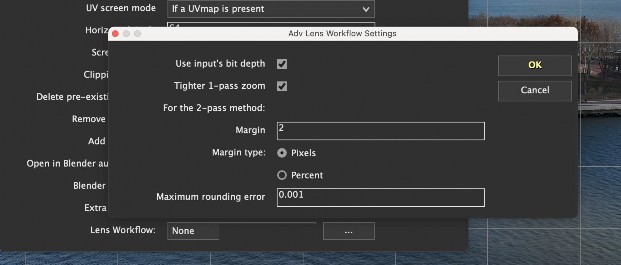
Clicking the “...” button next to the Lens Workflow dropdown opens workflow-specific settings:
Classic Lens Models: Opens the Lens Workflow Settings dialog with:
o Margin controls for 2-pass workflows
o Bit-depth handling
o Width = 16x resolution control
Advanced Lens Models: Opens the Advanced Lens Workflow Settings dialog with:
o Pixel or percent-based margins
o Maximum rounding error control
o Zoom framing behavior for overscan
Note: These settings affect only the export result, not your project, Image Preprocessor, or trackers.
©2026 Boris FX, Inc. — UNOFFICIAL — Converted from original PDF.
