 Marco Sebastiano Alessi |
May 14, 2026
Marco Sebastiano Alessi |
May 14, 2026


Every music producer knows that EQ is the most fundamental and powerful tool in audio production.
Since we know it can be a bit confusing to learn and master, today we’ll explore what EQ is in music and why it's so important in music and audio production in general.
Let’s dive in!
What Is EQ in Music?
EQ (short for equalization) is an audio production tool that can adjust the volume of different frequency ranges to refine your mix. For instance, you can raise or lower certain frequencies to create a balanced soundstage, highlight certain instruments or vocals, mitigate unwanted sounds, and make your track sound complete. It’s a bit like having separate volume controls for the bass, mids, and highs.
EQ is used for any audio-related production, from spoken words to music of any genre. However, they are also present in audio players to help you fine-tune your listening experience, making each instrument and vocals heard clearly and harmoniously in the track. With EQ, we speak in terms of boosting frequencies to make them louder and cutting to make them softer to make the overall audio sound good.
All sounds are made of frequencies, ranging from low to high in the frequency spectrum. EQ tools break down the frequency spectrum into several bands, usually in the human hearing range from 20Hz to 20kHz.
The following frequency group division can be used as a starting point and guide for equalization in music production.
Sub Bass Frequencies
The sub bass frequencies range from 20Hz to 40Hz (sometimes up to 60-80Hz) and are the lowest and deepest frequencies in the spectrum. Sub bass sounds are usually felt more than heard. Some examples of instruments found in the low end are the low notes of a pipe organ, a contrabassoon, or a synth bass.
We boost the sub bass to improve and add power to the low-end, for example, kick drums or bass lines. Additionally, we cut the sub bass to reduce the low-end muddiness.
Bass Frequencies
The bass frequencies are found in the 40-60Hz to 200Hz range. Boosting low frequencies can help sounds like bass guitars, cellos, and snares, as well as enhancing kick drums. You can easily make the sound boomy if you boost it too much, so boost with caution. Cut bass to keep reducing the muddiness.
Low-Midrange
The low-mid frequency range is 200Hz to 500Hz. Here you can add warmth and body to the mix, but most instruments clash in this range, so you must decide which to boost and which to cut. Here’s where you find vocals (especially male vocals) and many acoustic instruments. Boost vocals that get buried by other instruments, and add presence to acoustic guitars or synths. Cut those frequencies that compete with the ones you want to enhance. Sometimes it is better to cut than boost.
Midrange
The midrange is in the 500Hz to 2kHz range. It's the most sensitive area for the human ear, so you must be careful with the adjustments you make in this range. You can boost to add clarity and presence to electric guitars, piano, and violin.
Upper-Mids
This group ranges from 2kHz to 4kHz. The high mids can add attack and definition to the mix, but you need to listen carefully to avoid bringing harshness. Cut to reduce harsh sounds and boost to add clarity to vocals.
Presence
Often grouped and treated with the upper-mids, it ranges from 4kHz to 6kHz. Here you find instruments such as snare drums, cymbals, female vocals, hi-hats, flutes, etc. Boost to add more presence to these instruments and reduce harshness and sibilance by cutting them.
Highs, Brilliance, and Air
The high end ranges from 6kHz to 20kHz. Here are the most common hisses, noises, and instruments, such as cymbals, violins, piccolos, etc. You want to boost to add more presence to these instruments, but at this high end, you want to increase by very small amounts to avoid noise. Cutting these frequencies can help reduce sibilance and harshness.
These are just examples of bands. You must learn to identify where your sounds are so that you can boost or cut the right frequencies in your mix. In your practice, you'll find that many instruments overlap, and it is your job to find a way to make each instrument shine in the mix.
Why EQ Is Important in Music Production
EQ is as important in music production as in any other audio production. In music, it excels at achieving clarity, instrument separation, balance, and a professional sound overall. Without EQ, the instruments would all clash, occupying the same sonic space, and your mix would sound cluttered, muddy, or harsh. So, EQ is fundamental for shaping sound and sculpting each instrument's frequencies to make them fit together.
Creating Separation (Reduce Frequency Masking)
Masking occurs when two or more sounds compete for the same frequency range, resulting in a muffled and cluttered sound. EQ is used to make room for each instrument and vocals by cutting and boosting individual tracks to make everything clear.
Fixing Problems
EQ allows you to fix recordings by cutting unwanted and unneeded frequencies with EQ filters. A common use is to cut all the sub-bass frequencies of tracks that do not need them, such as vocals, electric guitars, and hi-hats, and to tame sibilance and harshness in the higher end to avoid listening fatigue. They can save your recordings if you captured low rumbles and hisses.
Tonal Shaping
EQ can be used creatively to enhance sounds, such as adding air to vocals and acoustic instruments, or punch to drums, and to change the tone of sounds. In sound design, EQ is often used to create different sounds, such as voice changes and audio that sounds like it’s coming from a radio or telephone.
Final Mix Balance
EQ is key in the final stages of mixing. Creating a good balance results in a pleasant listening experience, without ear fatigue, with all the elements sounding like they belong together. EQ is also used in mastering to polish the track's overall tone, ensuring the artistic choices are clearly delivered.
Different Types of EQ
There are different types of EQ hardware and software. Depending on your audio production software, you may find several EQ plugins available. Let’s discuss the most common types of EQ and their advantages in music production to find the right EQ for your projects.
The main difference lies in the number of parameters they offer the user and how the controls are displayed.
Graphic EQ
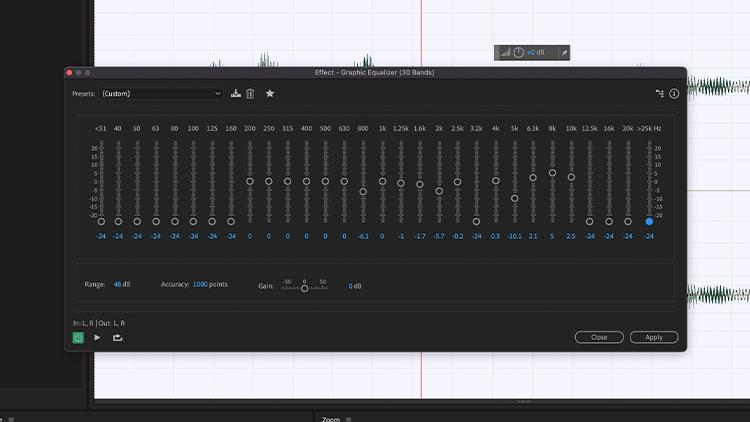
An EQ with fixed-frequency sliders to increase or decrease volume in a visual graphic curve. Because the bands are fixed, you can only control the gain level. It does not allow for surgical EQ work. Graphic EQ is most commonly used in live environments or for quick changes rather than in audio post-production.
Parametric EQ
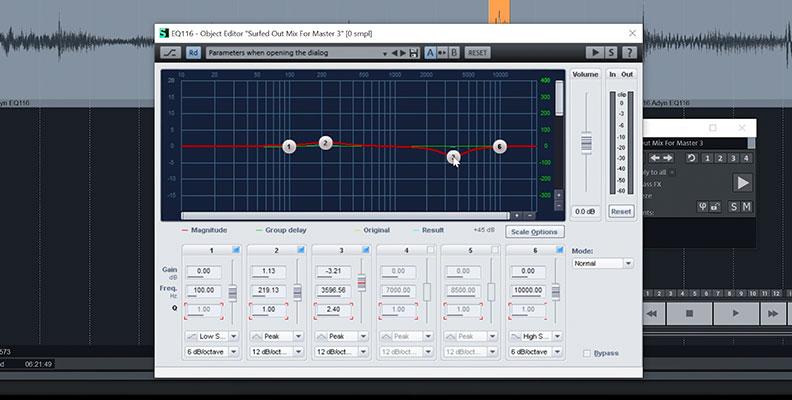
It is the most common EQ because of its versatility. It's available in most modern digital audio workstations and is great for surgical EQ, offering greater control and accuracy, while also handling broad curves. Parametric EQ is available in two options: Fully Parametric, with full control over the selected frequency, gain, and bandwidth, and Semi-Parametric, with control over the frequency and gain but a limited or fixed bandwidth.
Dynamic EQ
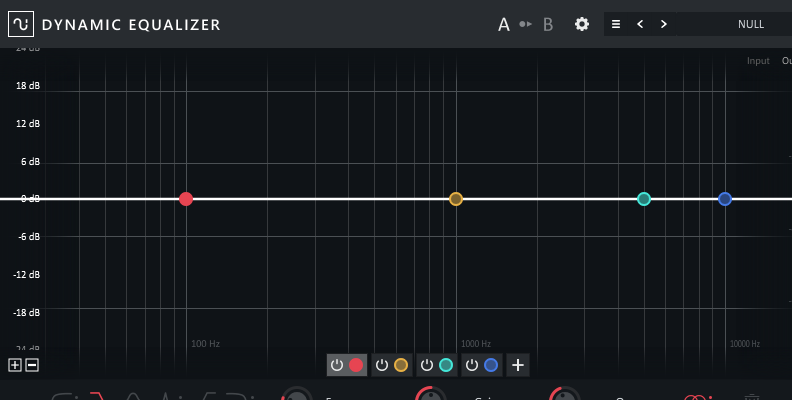
A dynamic EQ is a more complex tool that combines the accuracy and precision of a parametric EQ with dynamic control, such as a compressor, to automate gain in response to dynamic audio signals crossing an established threshold. Dynamic EQs help address troublesome frequencies that appear sporadically without affecting the overall tone.
How to Use Different Types of EQ in Music
EQ controls the volume of each frequency or frequency range using three main controls: frequency, gain, and Q. Depending on the type of EQ you're using, graphic EQ, parametric EQ, or dynamic EQ, you’ll have more or fewer controls. The features can also vary depending on the plugin developer you choose.
EQ Settings
Let’s understand what the three main controls do.
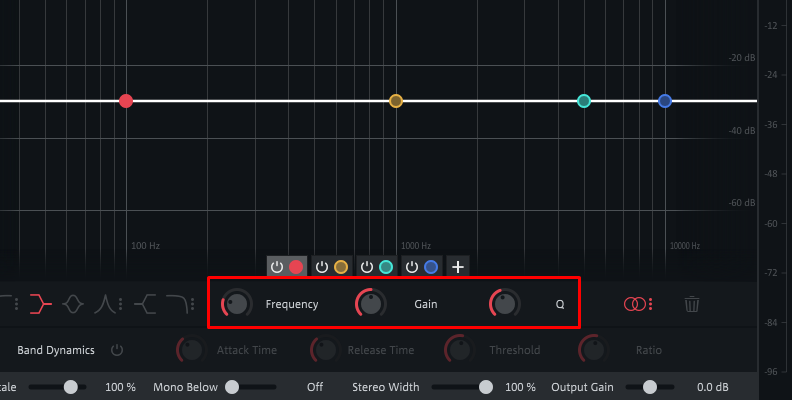
Frequency: lets you pinpoint problematic frequencies in Hz. In a graphic EQ, the frequency bands and their widths are fixed, but you can still select which band to boost or cut. In a parametric and dynamic EQ, you can choose the central frequency with a frequency knob or slider or by clicking in the UI.
Gain control: sets the amount of boost or cut at the chosen frequency in dBs. You can find it in a knob or a slider.
Q (Bandwidth): controls the width of the curve to allow more or fewer frequencies to be affected by the boost or cut. For accuracy at a specific frequency, a narrow width works best, but a wider curve can make the equalization sound less abrupt.
Understanding EQ Filters
There are also different types of curves or shapes applied to the sound you're equalizing, called filters. They represent how the frequencies are being altered.
High-Pass/Low-Cut Filter: Cuts all frequencies below a chosen cutoff frequency, allowing only high frequencies to pass. It is usually used as a subtractive EQ to remove unwanted sub-bass frequencies, mic noises, and plosives.
Low-Pass/High-Cut Filter: It works exactly like a high-pass filter, but it cuts all frequencies above the selected cutoff frequency and passes those below it. Low-pass filters help remove harshness and noise in the high-end, but can also be used creatively to make the sound distant.
High-Shelf Filter: boosts or cuts frequencies above a set frequency, then levels off. It’s used for musical adjustments, adding air and brilliance, and treble control.
Low-Shelf Filter: boosts or cuts frequencies below a specified frequency, and it levels off. Used for adjustments on the low end (bass control), adds warmth and tames lower troublesome frequencies.
Bell/Peak Filter: Uses a symmetrical bell-shaped curve to boost or cut around a center frequency. It can be used for surgical EQ with a high Q (narrow) or a broader curve with a lower Q (wide) to shape the tone. In some EQs, you may find it as a parametric band or simply "band".
Notch Filter: A more aggressive, narrower cut filter used for surgical subtractive EQ. It completely removes a specific frequency. For example, a bothersome low electrical hum or an ear-piercing sound.
Pass vs. Shelf Filters
There is some confusion between the pass and shelf filters, as both use a cutoff point. The main difference is that high-pass and low-pass filters eliminate frequencies on one side of the cutoff, which is more commonly used for subtractive EQ, while shelf filters boost or cut frequencies equally on one side of the cutoff, making them useful for both subtractive and additive EQ for broad tonal adjustments.
In summary, pass filters isolate and eliminate frequencies, while shelf filters level off frequencies.
Best Tools and Stock Plugins for EQ
Now that you know what EQ is, its importance in music production, and how to use it, you may be wondering which EQ tools and plugins are the best. For beginners, I always recommend starting with the DAW's stock EQ. With that in mind, I will start this list with DAWs that offer great stock EQ and end it with a few third-party plugins you can upgrade later.
Boris FX Samplitude 2026
Samplitude 2026 is the latest version now developed by Boris FX. It's a comprehensive audio production tool designed for beginners. It has advanced features like a standard parametric EQ (EQ116) and a more advanced Dynamic EQ for surgical, level-dependent corrections that integrate seamlessly with Samplitude's unique object-based editing.
Apple Logic Pro
Logic Pro is Apple's flagship DAW, and it's among the top audio production tools. It features several EQ plugins, with the primary and most comprehensive being the Channel EQ, which offers up to 8 bands, each customizable with different EQ filters. Other options include the Linear Phase EQ and the Vintage EQ collection, which emulate classic hardware for adding color. Logic also features Match EQ, which analyses the frequency curve or another audio track and applies it to yours.
Ableton Live

Ableton Live, another popular DAW for many electronic music producers, features a modern, fully parametric EQ (EQ Eight) with eight bands and filters per band. It also features a DJ-style 3-band EQ with three simple fixed bands, ideal for DJs and broad, quick, and creative EQ.
Third-Party EQ Plugins
FabFilter Pro-Q: the most used third-party plugin and the industry standard. It offers up to 24 different frequency bands, dynamic EQ mode on every band, and a visual analyzer. If you want to step up your game and dive into a professional field, FabFilter Pro-Q is the way to go.
iZotope Neutron EQ: offers AI-powered mixing assistance, a dynamic EQ with masking detection, and modules to achieve the best mix.
TDR Nova (Free): features a parallel dynamic equalizer, with four dynamic EQ bands and a built-in spectrum analyzer. It's an excellent beginner-friendly free EQ tool.
Final Words
EQ in music is a crucial tool to make the best mixes. EQ is easy to learn and use, but hard to master. When not used properly, it can do more damage than good to your audio, so it's best to start with small EQ adjustments, be patient, and trust your ears. Don't stress if you can't achieve high-quality audio, and avoid investing in third-party EQ plugins unless you know exactly what you're missing. Stock plugins from software like Samplitude, Logic, or Ableton Live are enough to take you from beginner to a professional mixer.
Good luck!